Citrus Cooking App Prototyping Process

Overview
In my graduate Prototyping and Implementation class, I worked in a team of four to prototype and test “Citrus”, a mobile and desktop application that provides home cooks with a personalized culinary experience for the recipe discovery and cooking tutorials.
In the following case study, I discuss my direct role in the prototyping process for Citrus.
Design Process
-
Ideate on the goals of the application & sketch preliminary lo-fi wireframes
-
Collaborate to synthesize a mid-fidelity prototype
-
Conduct usability testing on the interactive mid-fi prototype
-
Apply research results to create an improved final design
My Role
My primary role was to execute the user research process and inform the final design by:
-
Conducting usability test on the mid-fidelity prototypes
-
Analyzing user behaviors and anecdotes to generate insights
-
Translating insights into actionable recommendations that inform the high-fidelity prototype
Ideate & Sketch
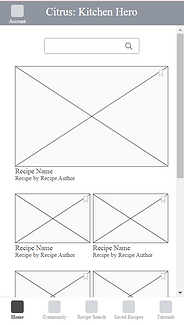
I started this project by ideating on the core functionality of the application: users select ingredients own to discover relevant recipes. In this process, my team and I leveraged a design charrette where we each sketched key pages individually, then came together to find commonalities in our designs and collaboratively generated low-fidelity wireframes using Axure.


Usability Testing
Based on the collaborative wireframes, my team created interactable mid-fidelity mobile (https://p2qvpd.axshare.com/) and desktop prototypes (https://6vqkde.axshare.com/).
Using these prototypes, I conducted qualitative usability tests with 5 participants.
Rationale
Usability testing at this stage was essential in understanding if there were any issues with the app's organization and functionality before investing time and resources into a final iteration.
Objectives
-
Evaluate the intuitiveness of the app's navigation
-
Discover areas of tension or confusion
-
Understand target users' behaviors and preferences
Recruiting
Because Citrus is a mobile and desktop application that provides users with a personalized culinary experience, I determined that the best participants for the study should cook regularly and use recipes often. I screened and recruited 5 participants who fit the following criteria:
-
Cook at least 3 nights a week
-
Used a recipe in the last week
-
Familiar with mobile and/or desktop apps
Understanding Current User Behaviors
Before beginning the tasks, I asked participants warm-up questions to gain context on their current cooking behaviors and how they utilize recipe tools. This helped gain insight into how Citrus can meet users' needs for recipe discovery and cooking guidance.
-
How often do you cook?
-
How do you usually decide what to cook?
-
Do you use any applications or websites to help you cook?
-
[If yes] Which app/website do you use?
-
[If no] Why not?
-
-
Did you use a recipe the last time you cooked a meal?
-
[If yes] How did you find that recipe?
-
[If no] Why not?
-
Usability Tasks
I gave participants three simple tasks based on the key actions users would perform on the app across mobile and desktop surfaces. I also instructed participants to think aloud as they completed the tasks and asked follow-up questions at the end of each task to understand the reasoning behind their behaviors.
Task 1: Add ingredients to the virtual pantry (mobile)
Recipe Search > Add Ingredients
or
Account > Your Pantry > Add Ingredients


Task 2: Search for a recipe using the ingredients in the virtual pantry (mobile)
(From Add Ingredients) > Your Pantry > (Choose pantry ingredients) > Search Recipes
or
(From Add Ingredients) > Recipe Search > (Choose pantry ingredients) > Search Recipes

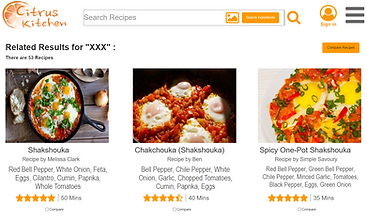
Task 3: Search for a recipe (shakshouka) and compare 2 recipe options (desktop)
Search "Shakshouka" in the search bar > Select "Compare" for at least 2 options > Compare Recipes


Retrospective Questions
After concluding all tasks, I gave participants the opportunity to reflect on their experiences using questions that ensured the next iteration would align with users' expectations preferences:
-
Did you have any difficulties completing the tasks?
-
What, if anything, was confusing or misleading about the layout?
-
What, if anything, was missing from the experience that would make it more useful?
Analyzing Results
Using qualitative data analysis, I identified themes in users' behaviors and generated insights:
Results
Task 1: Add item to pantry (mobile)
-
2/5 finished the task in one minute or less
-
0/5 used Recipe Search as the first option for finding the pantry
-
3/5 had difficulty navigating to Your Pantry
Task 2: Search recipes by ingredient (mobile)
-
5/5 finished the task in one minute or less
-
4/5 utilized the Recipe Search tab to accomplish this task
-
1/5 returned to Your Pantry first
Insights
The current location of Your Pantry is too obscure. "Recipe Search" is a misleading title for finding the pantry and the Account page is not an intuitive location.
"Recipe Search" is a helpful title when users intend to search directly for a new recipe.
Task 3: Search for recipes and compare two options (desktop)
-
2/5 finished this task in one minute or less
-
2/5 clicked the "Search Ingredients" button instead of the magnifying glass
-
1/5 had difficulty completing the task due to spelling errors when searching
Search functionality is unclear and cluttered. The close proximity of search by image and search ingredients options to the magnifying glass distracted users.
Because users were not notified of spelling errors they lacked clarity on how to progress when the page did not populate.
Informing the Hi-Fidelity Prototype
Based on the research findings, I proposed the following recommendations to improve users' experiences with Citrus. While I evaluated mobile and desktop prototypes, the team only had time to design the final mobile experience.
User Feedback: Users struggled with navigating to the pantry.
Recommendation: Change “Recipe Search” to “Your Pantry” to increase discoverability.

User Feedback: Search functionality is unintuitive.
Recommendation: Spelling errors should notifying users that there are no results for that entry and/or provide options with similar spelling (e.g., No results for “shashuka”. Did you mean “shakshouka”?)

User Feedback: Users shared the desire to import and export recipes from other applications.
Recommendation: Support compatibility with other applications. Allow users to export recipes from Citrus to their Pinterest boards or other applications. Similarly, Citrus should provide an option to import recipes from Google, Pinterest, or other locations.

User Feedback: Users value tailored recipe recommendations.
Recommendation: The Home page should include recommendations based on what recipes the user has saved. If users are coming to Citrus for inspiration, it would make discovering new dishes easier.

Reflection
Next Steps in the Cycle
This project allowed me to familiarize myself with the iterative product design process. While the project ended with a high-fidelity prototype, in an industry setting, I would expect to conduct more research on the final design, provide recommendations to implement before the product launch, and potentially support improvements to the live product experience as additional user needs surface.
Methodology Changes
Because there were a few problems with the prototype that affected user experiences, I would perform a preliminary heuristic evaluation on the mid-fi prototype to quickly identify design flaws before devoting time to testing with participants. During testing, I would also perform two rounds of tests to evaluate the mobile and desktop experiences separately. That way, I could take a deeper dive into both without biasing or fatiguing participants.
Developing Research Skills
I designed and execute a research plan, gathered user feedback, and translated insights into actionable insights that informed the app's design strategy. This demonstrates my aptitude for fulfilling the responsibilities of a product or UX Researcher. I look forward to putting these skills into practice to influence product decisions at any stage in the product lifecycle.